



-
Top 4 concerns for IT leaders when deploying AI assistants at work
As your organization seeks to roll out AI assistants for employees, you’ll want to address the following concerns to help promote AI adoption.
-
How Microsoft Copilot can help increase productivity with AI
Microsoft Copilot is designed with security, scalability and organizational intelligence features inside the Microsoft 365 environment, ensuring enterprise-grade security and compliance while delivering insights grounded in your organization’s data.
-
3 core departments you can augment today with Copilot and CDW
To illustrate how AI assistants can impact real business workflows, we dive into three departments that are core to most businesses: marketing, human resources (HR) and finance.
-
How CDW can help you implement AI with Microsoft Copilot
CDW, with our deep partnership with Microsoft, can assist organizations in implementing Microsoft Copilot by providing structured, secure and scalable enablement services that move businesses beyond experimentation into enterprise‑ready AI adoption.
3 Business Functions to Enhance Using AI with Microsoft Copilot and CDW
In this blog, we cover four key concerns IT leaders face while bringing AI to their workplace. We also dive into key use cases for three core business departments in using Copilot AI from our partners at Microsoft.


More and more Canadian organizations are using AI, but adoption is still not universal. As per CDW Canada’s 2025 Modern Workspace Trends Report, one-in-three (36 percent) employees use generative AI applications for ideation and brainstorming, while 28 percent use them for content generation.
AI assistants can create efficiencies and reduce workloads for employees with a lower learning curve. However, to generate meaningful responses, AI assistants must securely interact with business data and integrate deeply into the digital ecosystem of the workplace.
While implementing AI assistants, security gaps can elevate risks and erode employee trust in the outputs they generate. To address these concerns, IT leaders and teams need to plan AI implementation responsibly.
In this blog, we cover four key concerns IT leaders face while bringing AI to their workplace. We also dive into key use cases for three core business departments in using Copilot AI from our partners at Microsoft.
Top 4 concerns for IT leaders when deploying AI assistants at work
As your organization seeks to roll out AI assistants for employees, you’ll want to address the following concerns to help promote AI adoption.
1. Ensure security and compliance
One of the biggest challenges is ensuring that AI assistants handle sensitive organizational data securely and in compliance with regulations. IT leaders must guard against risks such as unauthorized data access, breaches and shadow AI usage, where employees adopt unapproved tools.
2. Lack of system integration
AI assistants often struggle to deliver value if they cannot integrate seamlessly with existing enterprise systems such as ERP, CRM or HR platforms. Improper integration leads to fragmented workflows, data silos and inconsistent information across tools, which undermines trust in the assistant’s outputs.
3. Establish safety guardrails
Another critical challenge is ensuring that AI assistants operate within safe and ethical boundaries. IT leaders must enforce policies that align AI behaviour with company standards and continuously monitor outputs, since risks evolve as models are updated.
4. Organization-wide scalability
Scaling AI assistants across an entire organization can create both technical and cultural hurdles. Performance bottlenecks can arise when thousands of users demand real-time responses, while cloud compute and licencing costs escalate quickly.
Beyond infrastructure, change management is essential as employees may resist adopting AI tools without proper training and communication.
How Microsoft Copilot can help increase productivity with AI
Microsoft Copilot is an AI assistant that is designed with security, scalability and organizational intelligence in mind. It lives inside the Microsoft 365 environment, ensuring enterprise-grade security and compliance while delivering insights grounded in your organization’s data.
Copilot natively supports the following features for AI implementation:
- Enterprise-grade security and compliance: Works within your trusted Microsoft environment, respecting permissions and data governance.
- Context-aware intelligence: Leverages Microsoft Graph and organizational data for personalized, accurate outputs.
- Seamless workflow integration: Embedded in Microsoft Word, Excel, PowerPoint, Outlook and Teams for seamless integration.
- Scalable innovation: Copilot Studio enables custom AI agents for specialized workflows without coding, making it adaptable for any department.
3 core departments you can augment today with Microsoft Copilot
To illustrate how AI assistants can impact real business workflows, we dive into three departments that are core to most businesses: marketing, human resources (HR) and finance.
Here are three use cases, along with prompts and benefits, for each department.
1. How Marketing can benefit from Copilot
Marketers can leverage Copilot for a variety of content, SEO and research-related tasks to improve their task efficiency. Its ability to understand marketing context and generate new ideas can help marketers with the following tasks.
- Content creation at scale: Copilot can rapidly create blogs, social posts and ad copy, reducing the burden of content creation. This allows marketing teams to spend more time on creative strategy and brand storytelling.
- Campaign optimization: By analyzing performance data, Copilot can highlight trends and recommend adjustments for A/B testing, SEO and targeting. These insights can help teams refine campaigns for maximum impact and efficiency.
- Personalization: Copilot leverages customer insights to craft tailored messaging that resonates with specific audiences. Personalized content can help drive stronger engagement, build loyalty and improve overall ROI.
- Workflow automation: Routine tasks like summarizing meetings, preparing presentations and managing social calendars can be automated. This streamlines operations within familiar apps, freeing employees to focus on higher‑value work.
Sample use case: Create social media posts from existing content
Prompt: Write 3 LinkedIn posts based on the attached blog on health and wellness goals, optimized for engagement.
Sample responses:
- Post 1: "Your health matters. Discover practical tips for a balanced lifestyle in our latest blog. Read more:"
- Post 2: "Busy professionals – wellness is possible! Explore strategies for nutrition, fitness and mindfulness. Learn more:"
- Post 3: "Preventive care starts today. Check out our guide to holistic wellness solutions. Full blog here:"
2. How Human Resources can benefit from Copilot
Human resource professionals can automate administrative tasks and boost employee engagement with data analytics support. Copilot can help HR with their everyday duties, such as:
- Recruitment automation: Copilot can help you quickly screen resumes, draft job descriptions and assist in scheduling interviews, reducing manual workloads. This can result in accelerated hiring cycles while ensuring consistency and fairness in candidate evaluation.
- Onboarding and training: Personalized onboarding kits can be created to help new hires settle in faster. Progress tracking within Microsoft Teams ensures employees complete training modules and allows managers to monitor development seamlessly.
- Employee engagement: Survey data and sentiment analysis provide real‑time insights into workforce morale. Copilot can turn these findings into actionable recommendations, helping leaders strengthen culture and retention.
- Policy and compliance: Copilot can assist in drafting HR policies aligned with organizational standards. Built‑in sensitivity labels and audit trails ensure compliance, transparency and accountability across the enterprise.
Sample use case: Streamline benefits and compensation communication
Prompt: Create a benefits comparison table against industry benchmarks and draft an email to employees explaining new options.
Sample response:
Benefit | Our Company | Industry Average |
Health Insurance | Premium | Standard |
Paid Time Off | 20 days | 15 days |
Retirement Plan | 6 percent match | 4 percent match |
Email Draft: “Exciting news! We’re enhancing our benefits to better support you. Here’s how our new package compares to industry standards…”
3. How Finance can benefit from Copilot
Finance teams can use Copilot embedded into Microsoft Excel and PowerPoint to analyze data patterns and clearly present data. The following use cases show how the finance department can benefit from AI.
- Automate repetitive tasks: Streamline month‑end close, reconciliations and report generation, making processes faster and more interactive. This reduces manual effort and frees finance teams to focus on strategic analysis.
- Forecasting and budgeting: Cash flow projections and variance analyses can be generated instantly using natural language prompts. This accelerates planning cycles and improves accuracy in financial decision‑making.
- Compliance and risk management: Built‑in compliance checks ensure adherence to regulatory standards while minimizing manual errors. Automated monitoring strengthens governance and reduces exposure to compliance risks.
- Data visualization: Charts and dashboards can be created in Microsoft Excel or Power BI without complex formulas. This empowers teams to interpret financial data more quickly and share insights across the organization.
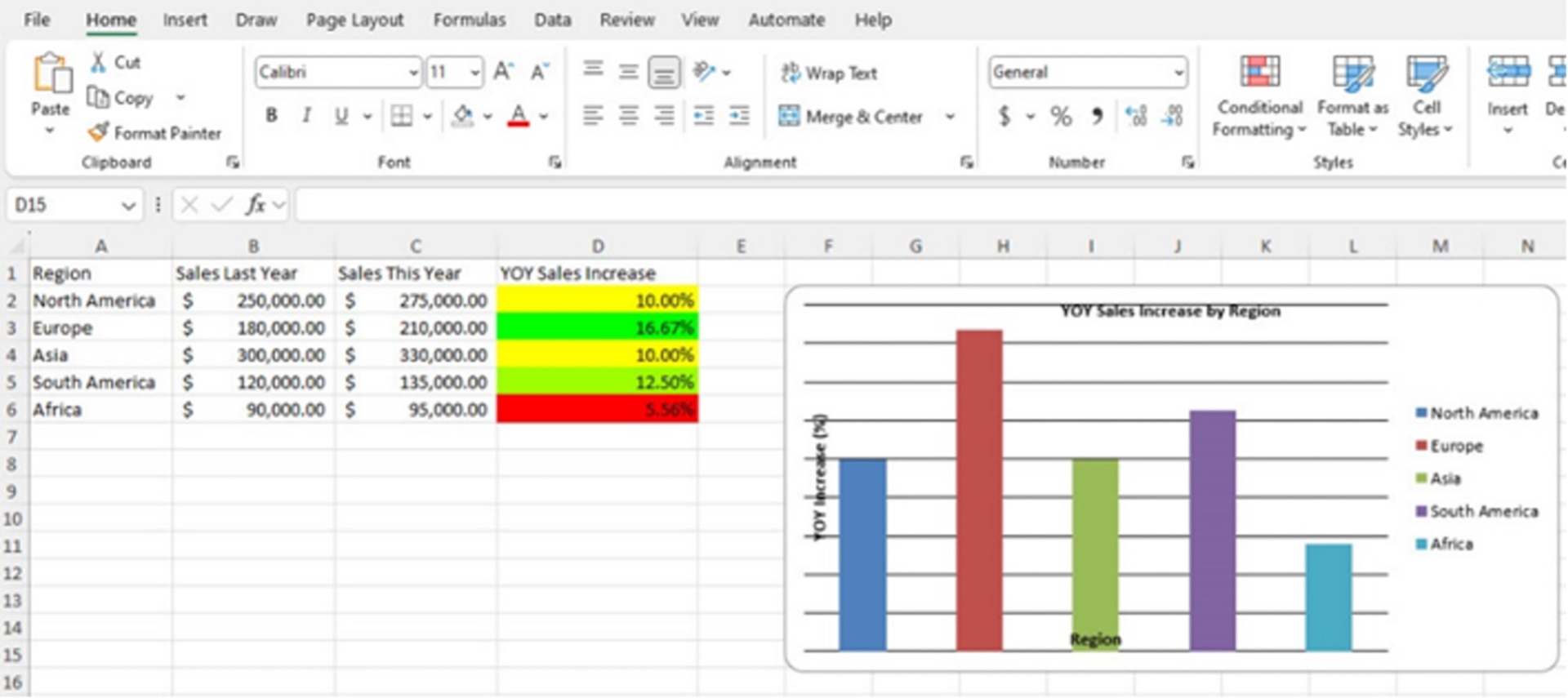
Sample use case: Data analysis in Excel
Prompt: Add a column for YOY sales increase. Add colour scale to the column.
Sample response:
- Added ‘YOY Sales Increase’ column
- Applied green-to-red colour scale for quick visual analysis
How CDW can help you implement AI with Microsoft Copilot
As your organization plans to adopt AI, CDW Canada can help you achieve a successful implementation with our advisory and technology services.
CDW, with our deep partnership with Microsoft, is equipped to assist organizations in implementing Microsoft Copilot by providing structured, secure and scalable enablement services that move businesses beyond experimentation into enterprise‑ready AI adoption.
Through our AccelerateAI Services, CDW supports every stage of the journey, from envisioning and proof of concept to full deployment and specialized solutions.
This includes identifying high‑impact business scenarios, coordinating stakeholders, embedding governance and compliance and driving user adoption through training and immersion programs.
As a premier Microsoft partner, CDW brings unique strengths that set us apart:
- Security leadership: Member of the Microsoft Intelligent Security Association (MISA) with 100+ security specialists.
- Recognition: Microsoft’s 2023 Modern Workplace Partner of the Year.
- Expertise at scale: 40+ Microsoft experts delivering proven frameworks for adoption, governance and measurable value realization.
- Trusted support: A self‑service licence portal and hands‑on guidance for overburdened IT teams.
Our core offerings for Microsoft Copilot include the following:
1. Copilot + Power Platform envisioning and proof of concept
- Ideal for organizations evaluating the feasibility and value of Microsoft 365 Copilot, Copilot Chat, Copilot Studio agents and Power Platform solutions
- Helps identify high-impact business scenarios and demonstrate tangible value through pilot deployments
2. Copilot + Power Platform deployment accelerator
- Supports full-scale deployment and adoption of Copilot and Power Platform solutions
- Includes planning, stakeholder coordination and technical enablement to ensure secure, compliant and scalable rollouts
3. Specialized Microsoft solutions
- Designed to meet unique organizational needs and deliver measurable business outcomes
- These solutions can range from design thinking workshops to building custom web chatbots to support your organization