

StarTech.com 2 Port Flush Mount ExpressCard 54mm SuperSpeed USB 3.0 Card Adapter with UASP Support - 5Gbps
$62.99
$56.99
Mfg # ECUSB3S254F
CDW # 2425507
| UNSPSC 43201552
Quick tech specs
- Add two flushmount USB 3.2 Gen 1 ports to your ExpressCard-enabled laptop
- 2 Port Flush Mount 54mm ExpressCard USB 3.2 Gen 1 Card Adapter with UASP Support
- 2Port USB 3.2 Gen 1 Adapter Card 54mm USB3 Card/EC USB 3.2 Gen 1 Card with UASP
- Compatible with Dell Latitude E5530
- ExpressCard USB 3 Controller/5 Gbps USB 3.2 Gen 1 Expresscard/Expresscard Laptop Card
- 2 Port Notebook USB 3.2 Gen 1 Express Card with optional built-in external DC power connector

Know your gear
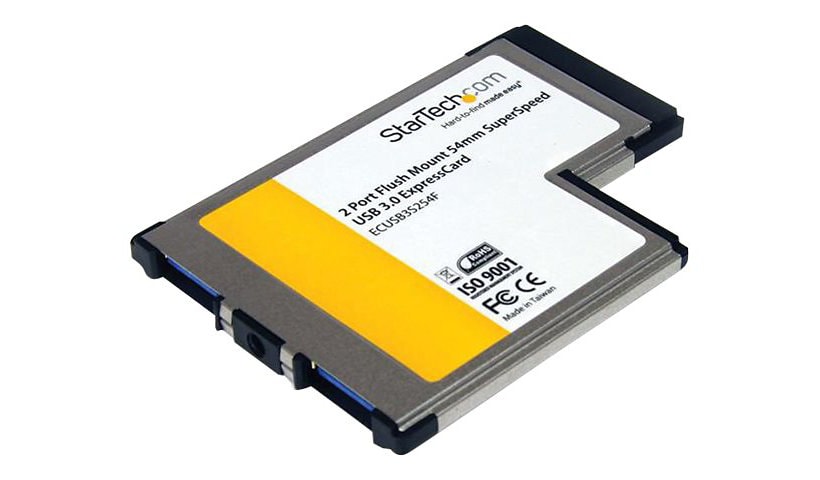
The ECUSB3S254F 2-Port Flush Mount USB 3.2 Gen 1 ExpressCard Adapter lets you add two USB 3.2 Gen 1 ports to your ExpressCard-enabled laptop.
The USB 3.2 Gen 1 card uses a unique design that allows it to sit flush in a standard 54mm laptop ExpressCard slot, creating a seamless add-on that can be left installed even while on the move, without having to worry about impact damage to either the card or the ExpressCard slot.
Enhanced with UASP support (USB Attached SCSI Protocol), this USB 3.2 Gen 1 controller performs up to 70% faster than conventional USB 3.2 Gen 1 when paired with a (Note: UASP requires a compatible operating system). Using a more efficient protocol than the traditional USB BOT (Bulk-Only Transport), UASP technology optimizes transfers by allowing multiple commands to be processed simultaneously, significantly increasing transfer speeds for less wait time on data transfers. See our UASP test results below for further details.
The SuperSpeed USB 3.2 Gen 1 Card supports data transfer rates of up to 5Gbps, and is backward compatible with USB 2.0 (at up to 480Mbps), or USB 1.1/1.0 at up to 1.5/1.2 Mbps respectively - the perfect laptop accessory for users to connect USB devices, both new and old.
Backed by a StarTech.com 2-year warranty and free lifetime technical support.
UASP is supported in Windows 8 and Server 2012. In testing UASP performed with up to a 70% faster read / 40% faster write speed over traditional USB 3.2 Gen 1 at peak performance.
At the same peak in testing, UASP also showed up to an 80% reduction in required processor resources.
Test results were obtained using an Intel Ivy Bridge system, StarTech.com add-on USB 3.2 Gen 1 cards, a UASP-enabled StarTech.com enclosure, and a SATA III solid state drive.
The USB 3.2 Gen 1 card uses a unique design that allows it to sit flush in a standard 54mm laptop ExpressCard slot, creating a seamless add-on that can be left installed even while on the move, without having to worry about impact damage to either the card or the ExpressCard slot.
Enhanced with UASP support (USB Attached SCSI Protocol), this USB 3.2 Gen 1 controller performs up to 70% faster than conventional USB 3.2 Gen 1 when paired with a (Note: UASP requires a compatible operating system). Using a more efficient protocol than the traditional USB BOT (Bulk-Only Transport), UASP technology optimizes transfers by allowing multiple commands to be processed simultaneously, significantly increasing transfer speeds for less wait time on data transfers. See our UASP test results below for further details.
The SuperSpeed USB 3.2 Gen 1 Card supports data transfer rates of up to 5Gbps, and is backward compatible with USB 2.0 (at up to 480Mbps), or USB 1.1/1.0 at up to 1.5/1.2 Mbps respectively - the perfect laptop accessory for users to connect USB devices, both new and old.
Backed by a StarTech.com 2-year warranty and free lifetime technical support.
UASP is supported in Windows 8 and Server 2012. In testing UASP performed with up to a 70% faster read / 40% faster write speed over traditional USB 3.2 Gen 1 at peak performance.
At the same peak in testing, UASP also showed up to an 80% reduction in required processor resources.
Test results were obtained using an Intel Ivy Bridge system, StarTech.com add-on USB 3.2 Gen 1 cards, a UASP-enabled StarTech.com enclosure, and a SATA III solid state drive.
More from the Manufacturer
Add to Compare
Enhance your purchase
StarTech.com 2 Port Flush Mount ExpressCard USB 3.0 Card Adapter with UASP is rated3.33 out of5 by3.
Rated 5 out of 5 bysinabhuile from Brilliant ProductArrived today!! StarTech 2 Port Flush Mount ExpressCard 54mm SuperSpeed USB 3.0 Card AdapterUp and running within seconds. The answer to all my USB problems. My lady needed to do an important report and needed to use a USB key. No problem, StarTech worked like a dream.
Date published: 2015-02-20T00:00:00-05:00
Rated 5 out of 5 bymrtflop from very good support service!My unity doesn't works at all and driver never could be installed.After a very poor review , the support service contacted me and in a brief chat by e-mail they fixed the problem, so my unit now work at the best .Thank you!4 stars because the driver not installs automatically on dell 640M with xp sp3 (italian releasing).For the support 5 (FIVE!!!!!) stars!!!!
Date published: 2017-02-12T00:00:00-05:00
Rated 5 out of 5 byLizard_king from Good add on for an older laptopI just received this earlier and it installed without issues using the drivers i took down from Startech. The speed is noticeably faster than the USB 2.0 ports and makes using this card a good choice.
Date published: 2015-10-14T00:00:00-04:00
Rated 5 out of 5 byAleksandr from Very slow!This card's USB 3.0 port transmits data slower than PC's USB 2.0 port.
Date published: 2016-10-08T00:00:00-04:00
Rated 5 out of 5 byBobtheEngineer from Works, but has issues.Driver installation was difficult. If you purchase more than one of these cards, interchanging them across different PCs wont work. Each card comes with an accompanying CD and you MUST install it's paired CD on your computer to use it. This seems to be a very sloppy method to install product drivers.The unit once installed properly does function as a set of two USB 3.0 ports. I use it to interact with a USB monitor adapter and have not had any issues for 2+ years running.The external jack seems to be broken as I was trying to run a USB3 vision camera with this card and did not have any luck. This was when I wired the external power cable to a phone charger for power. External jack is broken? All in all this product works, but it has its hiccups.
Date published: 2018-09-13T00:00:00-04:00